Depth: Support
Having problems? Here's how we can help.
First of all, our apologies if Depth isn't running or performing as you'd expect. You can help us get to the bottom of the issue you're experiencing by sending us some log files.
You'll find Depth log files in this location:
%MYGAMES%\Depth\DepthGame\Logs
(Your 'My Games' folder is generally inside 'My Documents')
You should see a bunch of '.log' files there, and possibly some '.dmp' files if you've experienced a crash.
Another useful file is the 'dxdiag' log file. You can generate this in Windows by going to the Start menu and typing in 'dxdiag'. A window similar to this should show up:

...where clicking on 'Save All Information' will create a TXT file with information on your drivers and hardware.
Having problems? Here's how we can help.
First of all, our apologies if Depth isn't running or performing as you'd expect. You can help us get to the bottom of the issue you're experiencing by sending us some log files.
You'll find Depth log files in this location:
%MYGAMES%\Depth\DepthGame\Logs
(Your 'My Games' folder is generally inside 'My Documents')
You should see a bunch of '.log' files there, and possibly some '.dmp' files if you've experienced a crash.
Another useful file is the 'dxdiag' log file. You can generate this in Windows by going to the Start menu and typing in 'dxdiag'. A window similar to this should show up:
...where clicking on 'Save All Information' will create a TXT file with information on your drivers and hardware.
You can then email these through to us at:
support@digitalconfectioners.com
Please include your Steam ID or Steam Profile URL in the email so that we can identify your account.
Thanks for your patience while we work to improve Depth.
Crashing on Windows 32-bit?
Ran out of video memory?
If you have 32bit Windows, then you may get this error.
- Run your Command Prompt as Admin
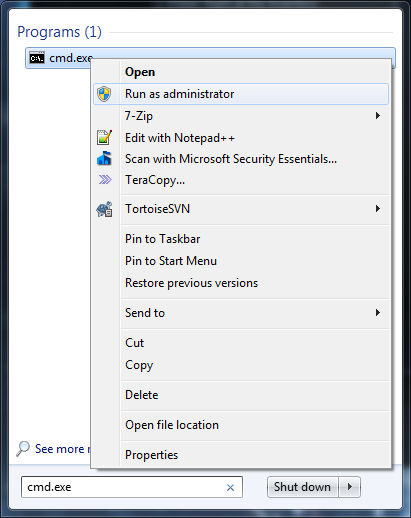
- Run this command: "bcdedit /set IncreaseUserVa 3072" without the quotes

- Restart your PC
- Set your texture details to low - this will stop Depth from using too much memory on textures.
Why
32-bit Windows (even if your CPU is 64-bit) can only use 4GB of RAM, total. That includes your GPU and system RAM, and some of this is reserved. So even if you have a lot of RAM installed, Depth may not be able to use 2GB (which it needs) on a modern system with a 32-bit OS.
Example: 8GB RAM installed, 2GB GPU. Typical RAM available to Windows/Depth: 4GB - reserved - GPU = < 2GB.
We strongly recommend gamers be using 64-bit operating systems. Especially if you're wanting to install GPU's >= 1GB.
Volume of other applications lowers when in-game
Depth has built in VOIP using Steam's voice interface.
Windows will detect this and will perform auto ducking on other applications.
To prevent this from happening, you need to disable this feature in Windows.